  sherrywang163       +8615989127990      sales@oawell.com
Please Choose Your Language
15.6" Arc Windows POS Terminal (Cash Reg)
You are here: Home » POS.KIOSK » POS System » 15.6 Inch POS Terminal » 15.6" Arc Windows POS Terminal (Cash Reg)

loading

Share to:
facebook sharing button
twitter sharing button
line sharing button
wechat sharing button
linkedin sharing button
pinterest sharing button
whatsapp sharing button
sharethis sharing button

15.6" Arc Windows POS Terminal (Cash Reg)

Arc-Perfect Design 15.6 Inch Touch Dual Screen Windows POS Terminal Cash Register  in good design and good quality , White color or Black color optional, Windows 10 Pro install 
Availability:
Quantity:
  • OA-90S

  • OAWELL

  • 15.6-Inch Capacitive Touch LCD

  • Intel Core i3,i5,i6,i7 Industrial Motherboard

  • 8-128GB,16-256GB

  • 11.6" ,13.3",15.6" Second Screen

  • LAN,WiFi,NFC Reader(Optional)


Scenario-Based Solutions


The arc-shaped Windows POS terminal combines ergonomics and high-end design, making it ideal for luxury and service-focused businesses. In luxury boutiques (e.g., high-end fashion, watches), cashiers spend 8+ hours per day on the POS—its curved screen reduces neck strain by 35% (compared to flat screens) and the sleek arc design matches upscale store interiors (e.g., marble counters, glass displays). In hotel lobbies, it integrates with property management systems (PMS) like Opera PMS and Cloudbeds to handle guest check-in payments, invoice printing, and room charge additions—no need to switch between multiple devices. For membership-based clubs (e.g., gyms, country clubs), it syncs with RFID card readers via USB or Bluetooth: when a member swipes their card, the POS automatically pulls up their membership level, past purchases, and available discounts (e.g., “Gold members get 15% off merchandise”), enhancing personalized service.


Product Features


Ergonomic Arc Design: 15.6-inch curved touchscreen with a 15°–30° adjustable tilt angle (to fit cashiers of different heights, 150cm–190cm). The arc radius of 800mm aligns with human eye curvature, reducing eye fatigue during long shifts, and the screen edge is rounded (no sharp corners) for safety.

Quiet Operation: Fan-less cooling system with aluminum heat dissipation fins (instead of noisy fans) keeps the terminal running at <30dB—quieter than a library (40dB), making it suitable for quiet environments like hotel lobbies or luxury boutiques where noise disrupts the customer experience.

Windows Ecosystem Advantage: Runs Windows 10 Pro (fully compatible with Microsoft Office tools like Excel for sales reports) and supports multi-language interfaces (20+ languages, including French, Italian, and Japanese). Integrates with Microsoft Dynamics 365 (for inventory and CRM) and QuickBooks (for accounting) with one-click setup.

Secure Data Storage: 64GB mSATA SSD (upgradable to 128GB/256GB) with AES-256 encryption (meets global payment security standards) to protect transaction data (e.g., credit card numbers, customer info). The SSD is shock-resistant (can withstand 1.5m drops) and has a 5-year lifespan (10x longer than traditional HDDs).


Technical Support & Services


Custom PCB motherboard development: For businesses with unique software or hardware needs (e.g., hotel POS requiring PMS integration, clubs needing RFID-specific functions), the team designs and manufactures custom PCB motherboards. The process includes requirements analysis (1 week), prototype testing (2 weeks), and mass production (3–4 weeks), with a 12-month warranty on custom boards.

48-hour on-site repair service: In major cities (e.g., New York, London, Paris, Shanghai), technicians arrive within 48 hours of a service request. For remote areas, “express replacement” is available: a new terminal is shipped first (arrives in 2–3 days), and the faulty unit is returned for repair (free shipping both ways).

Specialized training workshops: Conducts in-person or online training (2-hour sessions) on Windows POS system optimization (e.g., disabling unnecessary background apps to speed up performance), data backup (cloud + local backup methods), and basic data analytics (using Excel to generate sales trend reports, identify top-selling products). Workshops are free for up to 5 staff per business, with additional attendees charged at $20/person.
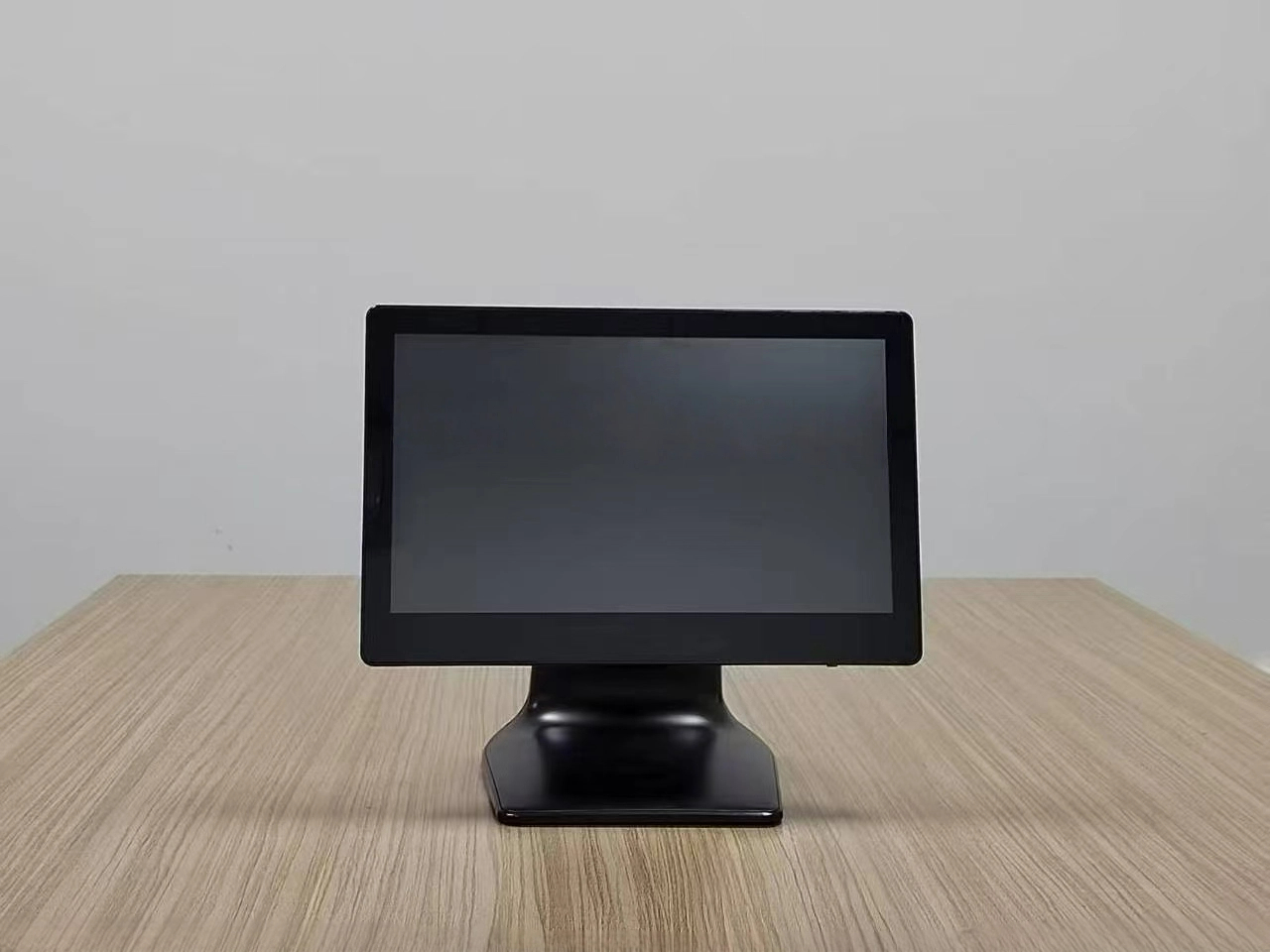

15.6" Arc Windows POS Terminal (Cash Reg)


Screen size  15.6 inch 
CPU Intel  i5, up to 4.1 GHz 
Display Output  Supports asynchronous dual display (VGA/LVDS/HDMI)
Graphics card Integrated Intel HD graphics card, supports DX9C
Input/output controller  ITE IT8786E
Memory 8G /16G RAM , Support DDR4 2666MHz
Single memory stick supports up to 16GB
Storage 128G SSD /512 SSD  2*SATA 1*NGFF-B(for SSD)
Resolution  Resolution min. FHD, 16:9
Screen angle adjust Possibility to adjust the height and tilt of the screen
Extrenal connect port connect a mouse and keyboard
Install  Possibility of mounting on a Vesa support
Optional parts  Built-in at least two 3-5W speakers
Built-in microphone 
Built-in camera
Bluetooth 5.1
WiFi
Expansion slot 1x MPCIE slot
1x MSATA slot
Audio  Realtek ALC897, supports Line-Out&Line-In
Ethernet Lan 2x ETH 10/100/1000 Gb/s
USB  4*USB2.0 6*USB3.0
COM  4*COM pins (2*COM standard)
Internal I/O 3 x USB pins
6 x COM pins
1 x 25 pin PRINT pin
1 x EDP pin/LVDS pin
1 x 4Pin SPEAKER pin
1 x 9Pin built-in audio interface (F_AUDIO)
1 x VGA display interface
1 x HDMI display interface
4 x USB3.0 interface
1 x Line Out audio interface
1 x LAN interface
1 x DCIN power interface
BIOS  AMI BIOS
Power supply  12V DC power supply (with a dedicated 230VAC/12VDC power supply) 
Cooling system Passive cooling system
Temperature Operating temperature: -20ºC~75ºC
Environmental humidity: -15%~60%
Operating system Windows 10/Windows 11 pro 64 bit 
POS working Area POS Monitor can be used with dispatch application - medical, energetic, transport, fire department,other
Previous: 
Next: 

FAQ

  • Q What Is the Difference Between a 58mm and an 80mm Thermal Receipt Printer?

    A

    The main difference is the supported paper width. A 58mm thermal printer is often used for compact receipts and space-constrained installations, while an 80mm printer can accommodate wider receipts with more room for item details and business information. Choose a printer based on your receipt layout, POS software settings, paper availability, connection interface, and installation requirements.

  • Q What Connectivity Options Should I Check Before Buying a POS Terminal?

    A

    Common connectivity options include USB and LAN, while some models also offer Wi-Fi, Bluetooth, serial ports, or optional NFC readers. The available interfaces differ by model and configuration. Check the number and type of ports required for your printer, scanner, cash drawer, network connection, and other accessories before confirming your order.

  • Q Can a POS Terminal Be Customized with a Built-in Thermal Printer?

    A

    Selected POS models can be configured with an integrated thermal receipt printer, while other models use a separate printer. Availability depends on the terminal design, printer width, internal space, and required interfaces. When requesting a customized solution, specify the screen size, printer width, operating system, and any additional peripherals you need.

  • Q How Do I Choose the Right POS Terminal for My Business?

    A

    The right POS terminal depends on your business type, POS software, daily transaction volume, available counter space, and required peripherals. Retail stores and supermarkets may need barcode scanners and cash drawers, while restaurants may benefit from dual-screen terminals and integrated receipt printers. Before choosing a model, confirm the operating system, processor, memory, storage, screen size, and connectivity options.

  • Q Should I Choose a Windows or Android POS System?

    A

    Windows POS systems may be suitable for businesses that rely on Windows-based applications or existing PC software. Android POS systems can be a practical option for compatible Android applications and simplified operating environments. Before ordering, check software compatibility, driver requirements, processor performance, memory, peripheral interfaces, and whether your application provider supports the selected operating system.

QUICK LINKS

PRODUCT CATEGORY

NEWSLETTER

Subscribe to the latest news

SOCIAL NETWORKS

Copyright © 2024 OAWELL Products Co., Ltd.  All Rights Reserved.  Sitemap I Privacy Policy