  sherrywang163       +8615989127990      sales@oawell.com
Please Choose Your Language
15.6" POS Machine w/ Thermal Printer
You are here: Home » POS.KIOSK » POS System » 15.6 Inch POS Terminal » 15.6" POS Machine w/ Thermal Printer

loading

Share to:
facebook sharing button
twitter sharing button
line sharing button
wechat sharing button
linkedin sharing button
pinterest sharing button
whatsapp sharing button
sharethis sharing button

15.6" POS Machine w/ Thermal Printer

1. Integrated All-in-One Design
Features a 15.6" FHD capacitive touchscreen with a built-in 58/80mm thermal printer. This compact design reduces cable clutter and saves 40% of counter space.
2. Industrial-Grade Performance
Powered by Intel Core i3/i5/i7 processors and up to 16GB DDR4 RAM. It ensures zero-lag multitasking for demanding retail, catering, and logistics POS software.
3. Versatile Connectivity & OS
Supports Windows 10/11 and Android. Equipped with dual Gigabit LAN, 10 USB ports, and optional NFC/WiFi, ensuring seamless integration with all global peripherals.
4. Durable & Customizable Build
Rugged aluminum frame with passive cooling operates from -20°C to 75°C. Offers OEM/ODM services including custom colors, logos, and dual-screen configurations.
Availability:
Quantity:
  • OA-900A

  • OAWELL

  • 15.6 Inch Capacitive Touch LCD

  • Intel Core i3,i5,i6,i7 Industrial Motherboard

  • 8-128GB,16-256GB

  • 7",9",11.6" ,13.3" Second Screen

  • 58mm/80mm Thermal Printer Inside

  • LAN,WiFi,NFC Reader(Optional)


Retail Environments: Simplifying Checkout & Inventory

Retail stores (apparel, electronics, home goods) often juggle POS terminals, receipt printers, and inventory tools—creating cable clutter and wasted space. The OA-900A solves this by integrating a 15.6-inch touch POS terminal with a built-in 58mm/80mm thermal printer. Staff can scan items, process payments, and print receipts from one device, cutting counter space usage by 40% compared to separate systems. The dual-screen option (15.6” main + 7”/9” secondary) also lets customers view item prices and loyalty points in real time, boosting trust.


Beauty & Wellness Studios: Enhancing Client Experience

Salons, spas, and gyms need POS systems that handle bookings, payments, and memberships—all while maintaining a premium look. The OA-900A’s sleek design (available in full black, full white, black+orange, or white+orange) matches high-end studio aesthetics. Its optional NFC reader lets staff scan client membership cards in seconds, and the built-in microphone/speakers enable video calls with booking support teams (e.g., resolving a client’s appointment conflict).


Logistics & Dispatch Centers: Durability for Extreme Environments

Logistics hubs and delivery centers operate in harsh conditions: cold warehouses (-20°C) or hot outdoor loading docks (75°C). The OA-900A’s operating temperature range of -20°C~75°C ensures reliable performance in these environments. Its 2×Gigabit LAN ports sync with dispatch software, and the built-in speakers confirm order updates aloud (e.g., “Delivery #123 Ready”)—critical for staff moving between trucks and desks.


Global Support & Services


OEM/ODM Customization for Global Brands

For international businesses or brands with specific needs, OAWELL offers end-to-end OEM/ODM services: pre-installing regional software (e.g., EU tax-compliant POS tools), adding language support (e.g., Spanish or Japanese), or customizing the device’s ports (e.g., extra USB slots for European card readers).


12-Month Warranty & 24/7 Technical Support

The OA-900A comes with a 12-month global warranty, covering all hardware defects. For technical issues (e.g., driver installation or printer jams), OAWELL’s support team is available 24/7 via email, phone, or video call—with multilingual support (English, Spanish, Mandarin) to assist global customers.

Out-of-the-Box Readiness

Every OA-900A includes a complete kit: 12V DC power adapter, data cable, user manual (in 5 languages), printer paper roller, and driver CD. This means businesses can unbox the device, connect it to their network, and start using it within 30 minutes—no extra purchases or technical expertise needed.
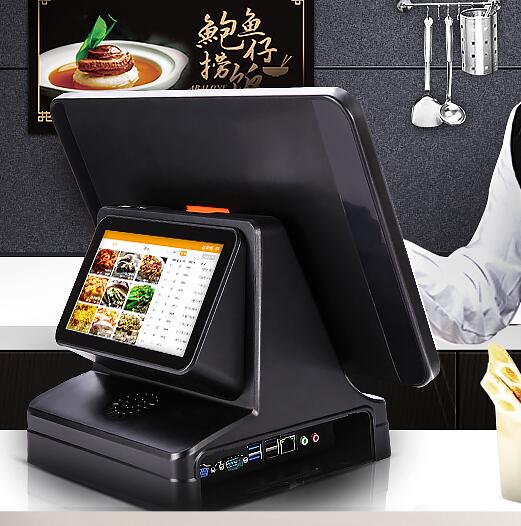


OA-900A Touch Pos terminal


Screen size  15.6 Inch Capacitive Touch LCD
CPU Intel  i5, up to 4.1 GHz 
Display Output  Supports asynchronous dual display (VGA/LVDS/HDMI)
Graphics card Integrated Intel HD graphics card, supports DX9C
Input/output controller  ITE IT8786E
Memory 8G /16G RAM , Support DDR4 2666MHz
Single memory stick supports up to 16GB
Storage 128G SSD /512 SSD  2*SATA 1*NGFF-B(for SSD)
Resolution  Resolution min. FHD, 16:9
Screen angle adjust Possibility to adjust the height and tilt of the screen
Extrenal connect port connect a mouse and keyboard
Install  Possibility of mounting on a Vesa support
Optional parts  58mm/80mm Thermal Printer Inside
Built-in microphone 
Built-in at least two 3-5W speakers
Bluetooth 5.1
WiFi
Expansion slot 1x MPCIE slot
1x MSATA slot
Audio  Realtek ALC897, supports Line-Out&Line-In
Ethernet Lan 2x ETH 10/100/1000 Gb/s
USB  4*USB2.0 6*USB3.0
COM  4*COM pins (2*COM standard)
Internal I/O 3 x USB pins
6 x COM pins
1 x 25 pin PRINT pin
1 x EDP pin/LVDS pin
1 x 4Pin SPEAKER pin
1 x 9Pin built-in audio interface (F_AUDIO)
1 x VGA display interface
1 x HDMI display interface
4 x USB3.0 interface
1 x Line Out audio interface
1 x LAN interface
1 x DCIN power interface
BIOS  AMI BIOS
Power supply  12V DC power supply (with a dedicated 230VAC/12VDC power supply) 
Cooling system Passive cooling system
Temperature Operating temperature: -20ºC~75ºC
Environmental humidity: -15%~60%
Operating system Windows 10/Windows 11 pro 64 bit 
POS working Area POS Monitor can be used with dispatch application - medical, energetic, transport, fire department,other


All-in-One Design to Reduce Complexity

Separate POS terminals and printers require extra cables, power outlets, and setup time. The OA-900A’s integrated design eliminates this: it’s a single device with no external printer to connect. This simplifies installation (done in 20 minutes or less) and reduces troubleshooting (e.g., no more “printer not connecting” errors during checkout).


Aesthetic & Ergonomic Customization

Every business has unique needs: a boutique may want a white POS to match its decor, while a warehouse may prefer black to hide dust. The OA-900A offers 4 color options, plus height/tilt screen adjustment—so staff can set the touchscreen to a comfortable angle (standing or seated). The 15.6-inch FHD screen (16:9) also ensures text and icons are clear, even for staff wearing safety glasses (common in warehouses).


Expandability for Growing Businesses

As businesses grow, their POS needs change—and the OA-900A grows with them. It includes 1×MPCIE slot (for adding 4G modules or extra RAM) and 1×MSATA slot (for expanding storage to 512GB+). For retail stores adding online orders, the built-in WiFi/Bluetooth connects to delivery management apps (e.g., Shopify Delivery) without extra hardware.


Technical Details: Performance & Reliability


Processing Power for Heavy Workloads

The OA-900A is powered by an Intel Core i5 (up to 4.1GHz) CPU, 8GB/16GB DDR4 RAM (supports up to 16GB per stick), and 128GB/512GB SSD. This handles heavy tasks with ease: running POS software, managing inventory (e.g., tracking 1,000+ product SKUs), and processing 100+ daily transactions—no lag, even during peak hours. The integrated Intel HD graphics card also supports DX9C, making it compatible with graphics-heavy apps (e.g., retail product image libraries).


Software Compatibility for Flexibility

Whether your business uses Windows or Android, the OA-900A works. It supports Windows 10/11 Pro (64-bit) for advanced software (e.g., QuickBooks or Lightspeed) and Android for lightweight, cost-effective apps (e.g., small retail POS tools). It also includes drivers for common peripherals (cash drawers, barcode scanners) to avoid compatibility issues.


Durability & Environmental Adaptability

The OA-900A’s aluminum alloy frame resists scratches and impacts—ideal for high-touch environments (e.g., retail stores with frequent customer interactions). Its passive cooling system prevents overheating, even when used for 12+ hours straight (common in 24/7 logistics centers). The device also handles humidity ranges of 15%~60%, making it suitable for coastal areas (where moisture damages electronics).


Previous: 
Next: 

FAQ

  • Q What Is the Difference Between a 58mm and an 80mm Thermal Receipt Printer?

    A

    The main difference is the supported paper width. A 58mm thermal printer is often used for compact receipts and space-constrained installations, while an 80mm printer can accommodate wider receipts with more room for item details and business information. Choose a printer based on your receipt layout, POS software settings, paper availability, connection interface, and installation requirements.

  • Q What Connectivity Options Should I Check Before Buying a POS Terminal?

    A

    Common connectivity options include USB and LAN, while some models also offer Wi-Fi, Bluetooth, serial ports, or optional NFC readers. The available interfaces differ by model and configuration. Check the number and type of ports required for your printer, scanner, cash drawer, network connection, and other accessories before confirming your order.

  • Q Can a POS Terminal Be Customized with a Built-in Thermal Printer?

    A

    Selected POS models can be configured with an integrated thermal receipt printer, while other models use a separate printer. Availability depends on the terminal design, printer width, internal space, and required interfaces. When requesting a customized solution, specify the screen size, printer width, operating system, and any additional peripherals you need.

  • Q How Do I Choose the Right POS Terminal for My Business?

    A

    The right POS terminal depends on your business type, POS software, daily transaction volume, available counter space, and required peripherals. Retail stores and supermarkets may need barcode scanners and cash drawers, while restaurants may benefit from dual-screen terminals and integrated receipt printers. Before choosing a model, confirm the operating system, processor, memory, storage, screen size, and connectivity options.

  • Q Should I Choose a Windows or Android POS System?

    A

    Windows POS systems may be suitable for businesses that rely on Windows-based applications or existing PC software. Android POS systems can be a practical option for compatible Android applications and simplified operating environments. Before ordering, check software compatibility, driver requirements, processor performance, memory, peripheral interfaces, and whether your application provider supports the selected operating system.

QUICK LINKS

PRODUCT CATEGORY

NEWSLETTER

Subscribe to the latest news

SOCIAL NETWORKS

Copyright © 2024 OAWELL Products Co., Ltd.  All Rights Reserved.  Sitemap I Privacy Policy