
- All
- Product Name
- Product Keyword
- Product Model
- Product Summary
- Product Description
- Multi Field Search
Views: 0 Author: Site Editor Publish Time: 2026-06-24 Origin: Site


Interactive terminals have shifted from high-end novelties to absolute baseline requirements. You now see them everywhere across retail, hospitality, and healthcare sectors. They drive modern operational workflows forward. We face intense market pressures today. Severe labor shortages constantly force teams to do more with less. Meanwhile, customers increasingly expect seamless self-service autonomy at every single turn. Furthermore, organizations desperately need standardized data capture methods to stay competitive. This article provides a highly pragmatic framework to evaluate these self-service solutions. We will help you build a solid business case and navigate deployment risks effectively. You will learn how to bypass vendor hype and select hardware that solves actual friction points. By the end, you will understand exactly how to integrate a reliable Touch Kiosk into your most critical operations.
Operational ROI: Modern touch kiosks primarily drive value through labor reallocation, increased transaction throughput, and consistent upselling, rather than just novelty.
Purpose-Driven Hardware: Success requires matching the kiosk category (e.g., self-checkout vs. wayfinding) to specific user-journey friction points.
Total Cost of Ownership (TCO): True costs extend beyond upfront hardware, requiring budgeting for MDM (Mobile Device Management), software licensing, and physical maintenance.
Compliance is Mandatory: Enterprise deployments must rigorously evaluate ADA/accessibility standards, EMV payment compliance, and data privacy frameworks before procurement.
Building a successful business case requires moving beyond aesthetics. You must focus on measurable operational improvements. The true return on investment relies on strategic resource allocation and enhanced throughput.
Many assume self-service terminals exist strictly to replace human workers. This assumption is largely incorrect. You rarely deploy a terminal to eliminate your staff entirely. Instead, you use it to divert highly routine transactions. Think about simple queue check-ins or basic menu ordering. When a terminal handles these repetitive actions, your team regains valuable time. They can instantly redirect their focus toward complex, high-value customer interactions. This strategic reallocation elevates overall service quality.
Long lines destroy customer satisfaction. Self-service terminals directly reduce wait times during severe peak hours. They process standard orders much faster than traditional registers. This speed directly impacts your customer abandonment rates. When people see a fast-moving digital queue, they stay. When they see a stalled manual line, they walk away. Improving throughput physically expands your capacity to serve without expanding your building footprint.
Human cashiers often forget to suggest add-on items. They get tired, distracted, or feel awkward asking. A programmed terminal never feels awkward. It presents upsell prompts with absolute, unquestionable consistency. This psychological reality drives significant revenue lift. Users frequently accept standard upgrades when prompted visually. Consequently, you will often see higher average ticket sizes compared to standard human-operated registers.
Manual data entry guarantees a certain percentage of human error. Typed names get misspelled, and email addresses lose critical characters. Terminals eliminate this transcription middleman. They capture user data exactly as entered. Furthermore, they immediately sync this standardized data directly into your centralized CRM or ERP systems. This automated pipeline ensures pristine data hygiene across your entire organization.
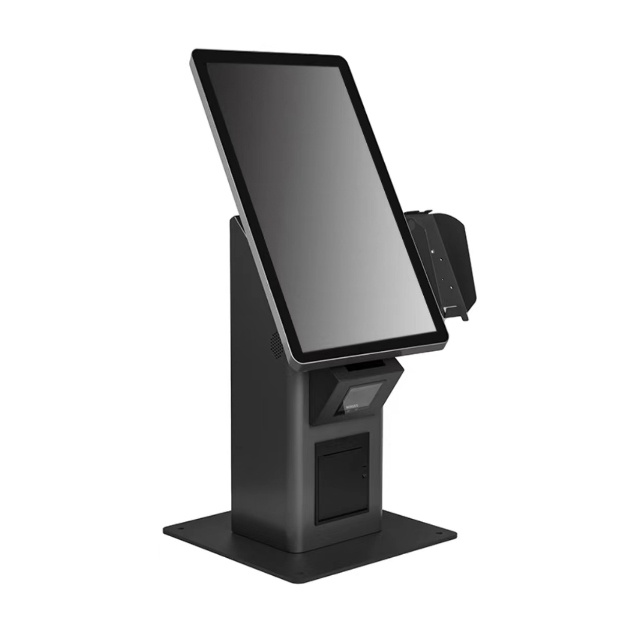
Selecting the perfect Touch Kiosk depends entirely on your specific user journey. You cannot force a single hardware profile into every possible scenario. Let us examine the dominant categories.
These units focus heavily on processing physical or digital payments rapidly.
Best for: Quick Service Restaurants (QSRs), busy retail spaces, and high-volume ticketing venues.
Key feature requirement: You absolutely need integrated POS peripherals. Secure enclosures protect internal components from theft. High-durability screens with strict IP ratings ensure survival against spills and heavy impacts.
These units prioritize data collection and secure identity verification.
Best for: Healthcare facilities, secure corporate lobbies, and hospitality desks.
Key feature requirement: Privacy screens keep sensitive data hidden from bystanders. High-resolution document scanners capture IDs perfectly. You also need seamless, low-latency API integration directly into your core booking software.
These sprawling interfaces help users navigate vast physical or digital spaces.
Best for: Large retail footprints, shopping malls, and massive corporate campuses.
Key feature requirement: You need large-format displays to capture attention. High-responsiveness touch panels (specifically PCAP) provide a natural, phone-like swiping experience. Real-time inventory system syncing prevents users from ordering out-of-stock items.
To summarize the primary operational differences, review the chart below:
Terminal Category | Primary Environment | Core Objective | Critical Hardware Component |
|---|---|---|---|
Transactional | Retail / Food Service | Accelerate checkout | Integrated EMV Readers |
Registration | Healthcare / Lobbies | Verify identity | Privacy Filters & Scanners |
Wayfinding | Campuses / Malls | Guide navigation | Large PCAP Displays |
Procuring commercial hardware demands strict evaluation criteria. Do not let sleek consumer-grade designs blind your operational judgment.
Never place a consumer tablet inside a metal box and call it a commercial solution. Consumer batteries swell under constant charge. Their screens burn out quickly. You must assess true commercial-grade components. Look closely at the Mean Time Between Failures (MTBF) ratings provided by the manufacturer. Proper thermal management remains crucial for strict 24/7 operation. Industrial-grade cooling prevents catastrophic overheating during peak summer usage.
You must choose the right touch interaction method for your specific environment.
Projected Capacitive (PCAP): This technology offers incredible multi-touch accuracy. It feels exactly like a premium smartphone. We highly recommend PCAP for indoor retail and pristine corporate settings.
Infrared (IR): IR uses a grid of light beams over the screen. It boasts extreme durability. More importantly, it registers inputs from heavy winter gloves or dirty hands. We recommend IR for industrial spaces or semi-outdoor deployments.
Always warn your procurement teams against locked-in, proprietary operating systems. A closed ecosystem traps your developers. You lose the ability to pivot when software trends change. We strongly recommend evaluating hardware that readily supports standard web apps. Ensure the unit runs clean installations of Windows or enterprise Android setups. This agnosticism guarantees long-term operational flexibility.
Hardware eventually breaks. A receipt printer jams, or a barcode scanner fails. You must evaluate how easily technicians can swap out individual components. Modularity saves massive amounts of downtime. If a card reader dies, you should replace the reader alone. You should never have to replace the entire monolithic terminal. Standardized peripheral mounting brackets represent a massive operational advantage.
Ignoring compliance frameworks invites devastating legal and financial penalties. You must treat security and accessibility as absolute foundational requirements.
Accessibility standards legally protect all users. You must strictly detail physical height requirements before bolting anything down. Reach ranges must accommodate users in wheelchairs. Furthermore, you cannot ignore digital accessibility. Your software must include screen-reader capabilities. The hardware must feature standard audio jacks for visually impaired users. Failing these standards directly creates severe discrimination liabilities.
A transactional Touch Kiosk instantly becomes a prime target for data theft. You must mandate EMV-certified card readers. Magnetic stripe readers are entirely obsolete and dangerous. Strict PCI compliance across the entire network is non-negotiable. Furthermore, you must enforce end-to-end encryption. Data must remain encrypted from the moment the user taps the screen until it reaches your secure servers.
Digital security means nothing if thieves can steal the physical machine. You must insist on robust anti-tamper enclosures. Secure mounting options dictate survival. Floor-bolted installations offer maximum security for freestanding units. Wall-mounted screens require specialized heavy-duty brackets. Internally, you must utilize strict OS lockdown protocols. "Kiosk mode" prevents curious users from swiping out of your app and exploiting the underlying operating system.
Executing a flawless rollout requires acknowledging unglamorous operational realities. Preparation prevents spectacular public failures.
Do not rely exclusively on standard facility Wi-Fi. Wireless networks drop out frequently during heavy foot traffic. A dropped connection during a credit card authorization creates massive customer frustration. We strongly recommend hardwired Ethernet connections for all critical transactional units. Hardwiring guarantees the consistent uptime your revenue stream demands.
Deploying fifty terminals without a management plan creates "orphaned hardware." You will eventually need to update the software or reboot a frozen screen. Driving a technician to fifty different locations wastes immense resources. You must implement a robust Mobile Device Management (MDM) strategy. MDM allows your IT team to push remote patches, force reboots, and actively monitor screen health from a central dashboard.
Users will ignore hardware that feels confusing or broken. Intuitive UI/UX design dictates your adoption success. Keep screen flows incredibly simple. Use high-contrast buttons and clear typography. Furthermore, strategic physical placement dictates visibility. A terminal hidden in a dark back corner will suffer severely low adoption rates. Place them directly in the natural flow of foot traffic.
Never forget the highly repetitive realities of physical maintenance. Screens get covered in fingerprints within hours. Receipt printers inevitably run out of paper rolls. Touch panels occasionally require manual recalibration. You must assign these specific physical tasks to daily shift workers. If you ignore basic cleanliness, users will refuse to touch the glass.
You must approach vendor selection with heavy scrutiny. Ask the difficult questions before signing any major procurement contract.
We strongly advise against mass-deploying blindly. Marketing brochures often lie about software stability. You must demand a localized Proof of Concept. Recommend a strictly controlled 1–3 unit pilot program first. Run these pilot units in your busiest location for thirty days. This pressure test reveals hidden software crashes and actual physical wear patterns.
Service Level Agreements (SLAs) determine your downtime misery. You must evaluate the critical difference between "depot repair" and "on-site support." Depot repair requires you to unbolt the machine, box it up, and ship it away for weeks. On-site support means the vendor sends a technician to fix it in your lobby. Always prioritize vendors offering rapid on-site replacement parts.
Siloed deployments always fail. You must assemble a cross-functional procurement team immediately. IT must evaluate the network security protocols. Operations must sign off on the physical footprint and paper-loading workflows. Marketing must own the UI/UX design and branding colors. If these three departments do not align, the deployment will fragment rapidly.
Embracing an interactive terminal strategy fundamentally transforms how you handle daily traffic. Reiterate constantly that this is not merely an isolated IT project. It represents a massive strategic operational shift for your frontline workflows. You are actively reallocating human capital toward better service.
The most successful deployments completely ignore flashy, untested form factors. Instead, they ruthlessly prioritize rugged physical durability, seamless software integration, and strict regulatory compliance. A boring machine that works perfectly 24/7 always beats a futuristic design that crashes at noon.
We highly encourage you to audit your current queue times today. Identify your exact operational bottlenecks and manual entry friction points. Once you locate the pain, determine if a small, three-unit pilot program serves as your logical next step toward modernization.
A: A standard commercial-grade unit typically lasts between 3 to 5 years. This timeline depends heavily on overall usage volume and specific environmental factors. Indoor units in climate-controlled spaces last longer. Semi-outdoor units facing direct sunlight or heavy temperature fluctuations usually require component replacements closer to the three-year mark.
A: Off-the-shelf enclosures drastically reduce your upfront lead time and simplify part replacement. We highly recommend them for standard deployments. Custom enclosures are generally only justifiable if you require highly specific corporate branding shapes or exceptionally unique peripheral combinations that standard boxes cannot physically accommodate.
A: You must standardize a strict "kiosk mode" application environment. This completely blocks regular users from accessing the underlying operating system. Additionally, you should physically disable or cover all exposed USB ports. Finally, utilize an MDM platform to push regular remote security patches directly to the fleet without local human intervention.
A: Implementing a holistic system requires allocating resources across four distinct areas. You must account for the primary physical hardware displays and protective enclosures. Secondly, you need specialized modular peripherals like scanners and printers. Thirdly, recurring software licensing and centralized MDM platforms require ongoing budgets. Finally, you must factor in the continuous labor required for physical installation, daily cleaning, and routine mechanical maintenance.


