
- All
- Product Name
- Product Keyword
- Product Model
- Product Summary
- Product Description
- Multi Field Search
Views: 0 Author: Site Editor Publish Time: 2026-06-10 Origin: Site


Transitioning away from legacy impact printers is a critical step for modern point-of-sale setups. Old dot-matrix devices often cause frustrating checkout bottlenecks and unexpected hardware downtime. Recurring consumable costs for ink and ribbons drain operational budgets. Slow transaction speeds lead to long queues and unhappy customers during peak hours. You need reliable hardware to keep operations running smoothly.
A modern thermal receipt printer serves as the current industry standard for high-volume environments. We will explore how these devices function, map their use cases across various settings, and highlight the specifications you must evaluate. You will learn to confidently select the right hardware to optimize checkout speeds, simplify daily maintenance, and reduce long-term operational expenses.
Thermal receipt printers use heat-sensitive paper, eliminating the need for ink cartridges or toner, fundamentally lowering operational overhead.
Their primary business purpose is to accelerate transaction speeds and reduce hardware failure rates through simplified internal mechanics (fewer moving parts).
Selecting the right unit requires matching hardware connectivity (Bluetooth, Ethernet, USB) with existing POS architecture and operational environments (retail vs. harsh kitchen settings).
While highly efficient, direct thermal prints are sensitive to heat and UV light, making them unsuitable for long-term document archiving without digital backups.
Understanding how a thermal receipt printer operates helps managers make better purchasing decisions. Direct thermal technology selectively heats chemically treated paper. A specialized printhead applies targeted heat to specific microscopic dots. The chemical coating on the paper reacts instantly. It turns black where the heat touches it. You never need to install ink cartridges. They completely eliminate messy ribbon replacements.
Shifting to a paper-only model stabilizes your recurring supply costs. Managers appreciate predictable operational budgets. Traditional impact printers force you to constantly monitor ink levels. You must buy replacement ribbons continuously. Direct thermal units remove this financial drain entirely. You only purchase the heat-sensitive paper rolls.
The engineering advantage is incredibly clear. Direct thermal mechanisms contain significantly fewer moving parts. They do not rely on complex gear systems to advance ribbons. You drastically reduce the risk of paper jams. Mechanical breakdowns happen far less often during peak business hours. Fewer moving parts translate directly to superior hardware longevity.
Below is a summary chart comparing direct thermal technology against legacy impact hardware.
Feature | Direct Thermal Printer | Traditional Impact Printer |
|---|---|---|
Consumables Required | Treated paper only | Paper rolls and ink ribbons |
Moving Parts | Very few | Many complex gears |
Maintenance Need | Low (occasional cleaning) | High (ribbon changes, gear fixes) |
Jam Probability | Extremely low | Moderate to high |
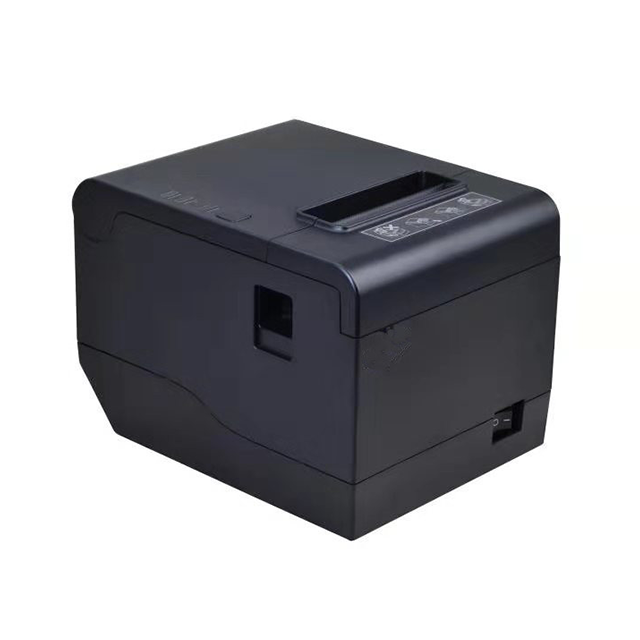
High-volume commercial environments measure success in seconds. Transaction velocity directly impacts daily revenue. Industry standards for modern units range from 200mm/s to 300mm/s. These devices produce long receipts almost instantly. Saving five seconds per transaction keeps queues moving smoothly. Customers abandon long lines when wait times increase. Fast printing mitigates queue abandonment entirely.
The acoustic footprint also matters immensely. Traditional dot-matrix units generate loud, disruptive buzzing sounds. Direct thermal units operate in near silence. Quiet operation improves the customer experience at checkout. They also feature highly compact form factors. Counter space is often extremely limited. A small footprint fits easily into crowded retail counters or cramped service desks. You preserve valuable space for impulse-purchase merchandise.
These devices also serve a critical security function. They integrate seamlessly with standard cash management systems. Most models include an RJ11 or RJ12 kick-out port on the back. The printer acts as the physical trigger for the cash drawer. The POS software sends a print command. The device then fires a 24-volt pulse through the RJ12 cable. This pulse physically opens the locked cash drawer. This integration guarantees the drawer only opens during authorized transactions.
Common Mistake: Many buyers purchase a unit without checking the drawer port voltage. Always verify your cash drawer requires a 24V trigger, which is the standard output for most receipt hardware.
Different operational environments demand specific hardware configurations. You must understand how environmental risks impact device performance. Mapping your specific use case ensures you buy the right equipment.
High-Volume Retail & Grocery: Continuous operation is mandatory here. Grocery cashiers cannot stop to thread complex paper rolls. These environments rely heavily on "drop-in" paper loading designs. Cashiers simply open the lid, drop a new roll inside, and close it. Minimal interruption keeps the checkout lanes flowing rapidly. Fast receipt generation is the primary goal.
Hospitality & Kitchen Environments: Restaurants present a unique risk context. Front-of-house operations benefit greatly from silent, fast thermal units. However, back-of-house realities are harsh. Kitchens generate extreme heat and airborne grease. Direct thermal paper turns completely black when exposed to excessive heat. Cooks often place tickets under heat lamps. Heat lamps destroy thermal paper instantly. You must use specialized heat-resistant enclosures or stick to impact printers near hot ovens.
Logistics & Labeling Flexibility: Warehouses and shipping desks require versatility. Some models support adjustable paper guides. These devices transition seamlessly between printing standard receipts and adhesive shipping labels. You simply slide the plastic guide to accommodate narrower label rolls. This flexibility eliminates the need to buy separate dedicated label makers for inventory tasks.
Best Practice: Conduct an environmental audit before purchasing. If ambient temperatures routinely exceed 110°F (43°C), rethink placing direct thermal hardware in that specific zone.
Selecting the right hardware goes beyond looking at price tags. You must evaluate connectivity, performance metrics, and form factor ratings carefully. Follow these structured steps to evaluate your options.
Assess Connectivity & POS Compatibility: You must map your hardware ports correctly. Legacy systems often require USB or Serial port connections. Modern cloud-based tablet systems demand Ethernet, Wi-Fi, or Bluetooth. Systems like Square, Shopify, or Lightspeed often lock down compatibility. You must verify the device uses recognized command protocols. ESC/POS emulation compatibility is an absolute necessity for seamless software integration.
Analyze Performance Metrics: Spec sheets can seem overwhelming at first. Focus primarily on Print Speed, rated in millimeters per second (mm/s). Look for at least 250mm/s for busy stores. Next, check the Dots Per Inch (DPI) rating. A standard 203 DPI offers excellent text and logo clarity. Finally, evaluate the Auto-Cutter lifespan rating. Commercial units should guarantee at least 1.5 million cuts before failure.
Review Environmental & Form Factor Ratings: Consider the physical design of the casing. Evaluate IP ratings for dust and spill resistance. Bars and coffee shops frequently spill liquids on counters. Spill-proof top covers prevent moisture from reaching the motherboard. Check for built-in wall-mount capabilities if counter space is zero. Evaluate the cable management design underneath the unit to hide unsightly cords from customers.
Every technology carries inherent limitations. We must transparently address the archival limitation of direct thermal prints. The chemical coating remains highly sensitive after printing. Receipts fade quickly under heat, friction, or direct UV exposure. Leaving a receipt in a hot car turns the paper black. Leaving it in sunlight bleaches the text away completely.
This fading poses a risk for long-term document archiving. Tax authorities require records to remain legible for years. You must implement solutions to counter this fading. Offer digital receipt alternatives via email or SMS. Establish scanning protocols to digitize important paper receipts immediately. Digital backups solve the archival limitation entirely.
Printhead degradation represents another implementation reality. Real-world maintenance determines hardware lifespan. Paper rolls shed microscopic dust as they run through the feed mechanism. This dust builds up directly on the heating elements. Over time, it blocks the heat transfer. The text becomes faded or streaky. You must perform routine cleaning. Wipe the printhead gently using a swab dipped in isopropyl alcohol. This simple habit preserves the thermal element indefinitely.
Paper quality heavily influences device longevity. Ultra-cheap thermal paper feels highly abrasive to the touch. Abrasive paper prematurely grinds down the delicate protective coating on the printhead. Poor paper costs you more in early hardware replacements. We advocate strongly for BPA-free, standard-thickness rolls. Good paper balances daily supply costs against long-term hardware preservation.
Recommended Maintenance Schedule | ||
Maintenance Task | Frequency | Required Tools |
|---|---|---|
Clean printhead elements | Every time you change a paper roll box | Isopropyl alcohol, cotton swab |
Blow out interior paper dust | Once a month | Compressed air canister |
Inspect auto-cutter blades | Every six months | Tweezers to remove paper scraps |
The purpose of a modern thermal receipt printer goes far beyond putting text on paper. It ensures robust operational continuity when stores get busy. Removing ink from the equation guarantees excellent cost predictability month over month. Rapid printing capabilities drastically improve checkout speed and customer satisfaction.
Before purchasing your next device, take specific action steps. First, audit your current POS software platform. Check their exact hardware compatibility list to avoid protocol mismatches. Second, measure your available counter space to ensure the footprint fits your service area. Finally, determine your exact connectivity requirements. Decide whether a hardwired Ethernet connection or a wireless Bluetooth setup serves your specific workflow best.
A: No, they do not require ink or toner cartridges. They use a specialized direct-heat mechanism. A heated printhead makes contact with chemically treated paper. The heat causes the paper to change color, producing crisp text and images instantly. This eliminates the need for messy consumable replacements.
A: They primarily print in monochrome (black). Some highly specialized paper rolls contain multiple chemical layers. These layers can produce two-color prints, usually black and red, depending on the temperature applied. However, this special paper is rare and significantly more expensive than standard rolls.
A: A standard receipt typically lasts between one to five years. The lifespan depends entirely on storage conditions. Direct thermal paper remains highly vulnerable to ambient heat, friction, and UV light exposure. Keep receipts in dark, cool, dry places to maximize their legibility over time.
A: No. Software vendors often implement strict hardware-locking. Many popular iPad POS apps only recognize specific models from partnered manufacturers. You must always check the proprietary vendor hardware compatibility lists before buying. A device might function perfectly but fail to communicate with your chosen software application.


