
- All
- Product Name
- Product Keyword
- Product Model
- Product Summary
- Product Description
- Multi Field Search
Views: 0 Author: Site Editor Publish Time: 2025-06-13 Origin: Site


For many businesses today, especially those operating in dynamic, space-limited environments, having the right tools can directly influence customer satisfaction and operational success. One such essential tool is the POS mini thermal printer. Whether you’re issuing receipts on the move or printing labels in a compact setting, choosing the right model ensures efficiency, cost-effectiveness, and long-term reliability. With multiple options available on the market, selecting the right thermal printer can seem daunting—but with the right guidance, it becomes a strategic investment. OAWELL Products Co., Ltd., a trusted manufacturer of advanced POS hardware, offers a wide variety of thermal printing solutions tailored to specific business needs.
Though often overlooked, printers play a central role in transaction flow and customer interaction. Selecting the wrong device can lead to technical hiccups, unnecessary expenses, and lost business opportunities. For mobile setups in particular, poor printer performance can cause critical delays.
When a printer malfunctions or runs out of power during service hours, it interrupts the transaction process and negatively impacts the customer experience. This kind of downtime not only causes frustration but may result in fewer returning customers.
Moreover, the initial cost of a printer is only part of the story. The total cost of ownership includes maintenance frequency, consumables (like paper or power), and device lifespan. Opting for a low-quality mobile receipt printer may lead to more frequent replacements, increased repairs, and higher long-term expenses.
Understanding the basic categories of POS mini thermal printers is the first step toward making an informed decision. Different setups suit different workflows and industries.
Bluetooth vs USB: Bluetooth-enabled printers offer wireless convenience, making them ideal for mobile businesses such as delivery services or food trucks. USB models, on the other hand, are often preferred for fixed setups where stable connection and power are more readily available. OAWELL offers both types to match your setup flexibility.
With Display vs Without: Some models come with a built-in screen, providing real-time feedback on battery life, connection status, or error alerts. While display-free models may be more compact and cost-effective, having a display can add convenience, especially for staff with less technical experience.
Built-in Battery vs External Power Only: For mobility-focused businesses, printers with built-in rechargeable batteries are indispensable. However, if your printer will be used at a fixed counter, a power-only model may be a more affordable and reliable choice.
Choosing among these types depends largely on how, where, and how often your business will use the printer.
Not all mini thermal printers are created equal. Focusing on specific performance factors can help you narrow down the best model for your operations.
Battery Life: Look for a printer that can last an entire work shift without requiring a recharge. OAWELL’s battery-operated models are built for high efficiency, supporting extended use for delivery drivers, event vendors, and more.
Print Speed: Measured in mm/s, print speed directly affects service efficiency. High-speed printers reduce customer waiting time and are especially useful during peak hours.
Compatibility: Your printer must seamlessly integrate with your existing POS system. Whether you're using Android tablets, iOS smartphones, or Windows-based terminals, ensure the printer is compatible across platforms.
Paper Width and Type: Common paper widths include 58 mm and 80 mm, with the former often used for mobile applications due to its compactness. For more detailed receipts or labels, a wider format might be preferable.
These features not only determine how smoothly the printer performs daily tasks but also how adaptable it is to future business growth.
Different industries demand different features from their mobile receipt printers. Here’s how to align printer specifications with your field of operation:
Retail: Fixed or semi-mobile retail outlets often need printers that handle continuous use and can print clear, branded receipts. Compatibility with barcode or QR code formats is also useful for inventory tracking or promotions.
Food Delivery: Delivery personnel benefit from lightweight, battery-powered models with wireless connectivity and fast print speed. Weather resistance may also be a consideration for outdoor use.
Warehouse or Logistics: These operations often require label printing in addition to receipts. A model like OAWELL’s label thermal printer is ideal, offering durability and long-range connectivity, especially when used with handheld scanners.
Indoor vs Outdoor Use: Outdoor use demands tougher casings and longer battery life, while indoor use might focus more on speed and integration.
High-Traffic vs Occasional Printing: High-volume businesses should invest in higher-end models with fast throughput and durable construction. For occasional use, an entry-level printer might suffice, offering basic functionality at lower cost.
Choosing based on industry-specific needs ensures that your printer performs well under real-world conditions and aligns with your team’s workflow.
Even the most advanced printer is only as good as its integration with your existing POS system. Software compatibility and ease of setup are vital considerations:
Cloud Printing and App Support: Some modern POS systems operate via cloud platforms or mobile apps. Make sure your chosen printer supports this, especially if you manage transactions from smartphones or tablets.
SDK and Driver Availability: A reliable supplier should provide detailed documentation, software development kits (SDKs), and drivers to support easy integration. OAWELL offers extensive developer support and resources to ensure smooth configuration.
Testing Before Purchase: It’s always wise to test the printer with your specific POS software before committing to a bulk order. Many providers, including OAWELL, offer sample units or demo sessions to ensure compatibility.
Software support isn’t just about plug-and-play; it’s about long-term functionality, updates, and scalability as your business grows or transitions to new platforms.
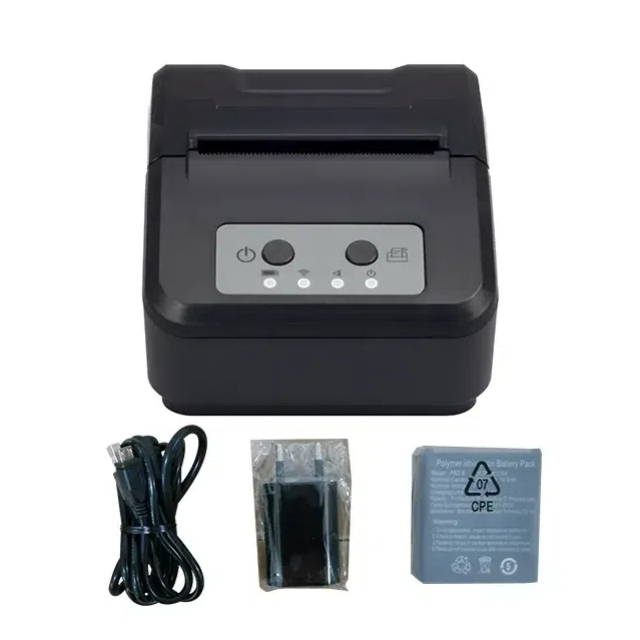
Choosing the right POS mini thermal printer is not simply a matter of picking the cheapest or most popular model—it’s about selecting a device that fits your operational needs, integrates smoothly with your system, and delivers long-term value. By considering connectivity, durability, print quality, and software support, you position your business for greater efficiency and customer satisfaction.
OAWELL Products Co., Ltd. is proud to support businesses with a wide range of high-performance mini thermal printers, from compact receipt models to advanced label printers. Whether you’re in retail, food delivery, or logistics, our solutions are designed to help you work smarter and faster.
Contact us today for expert advice or a product recommendation tailored to your business. Let us help you find the perfect mobile receipt printer to boost your efficiency and customer service.


