
- All
- Product Name
- Product Keyword
- Product Model
- Product Summary
- Product Description
- Multi Field Search
Views: 0 Author: Site Editor Publish Time: 2025-06-24 Origin: Site


In today’s fast-paced, customer-centric business world, providing a seamless, satisfying experience is critical to success. Whether you're managing a bustling food truck, operating a pop-up boutique, or running an on-the-go delivery service, efficiency and clarity at the point of sale can directly influence customer satisfaction. Often overlooked, the quality and speed of your receipts play a key role in shaping that experience. The POS mini thermal printer is not just a convenient tool—it’s a strategic asset. At OAWELL Products Co., Ltd., we understand how the right printing solution can enhance every touchpoint in the customer journey.
To many customers, the receipt is more than just a record—it's proof, reassurance, and even a point of reference. The quality of that printout can significantly influence how customers perceive your service professionalism.
Transaction Transparency: A well-printed, accurate receipt gives customers confidence that their transaction was processed correctly. When prices, tax, and totals are clearly shown, it removes any ambiguity or suspicion about the billing process. This is particularly important in environments where rapid transactions take place.
Tax and Legal Documentation: For freelancers, business travelers, or expense-account users, receipts are essential documentation. A smudged or faded receipt could make reimbursement impossible or delay tax filing processes. Precision matters, and thermal printers ensure legibility and completeness.
Returns and Warranties: Customers often store receipts for weeks or even months, especially for electronics or apparel. If the print fades or the paper quality is poor, it creates friction during returns or warranty claims. In contrast, thermal printers produce longer-lasting receipts that remain readable over time.
These practical needs illustrate why receipt quality isn't just a backend concern—it directly affects customer confidence, loyalty, and repeat behavior.
When printers malfunction or slow down, it’s not just a technical hiccup—it’s a direct hit to the customer experience. Long lines, delays, or unreadable receipts create frustration and reduce satisfaction.
Slow Printing Speeds: Conventional printers often struggle under volume. During peak hours, this delay becomes noticeable and annoying. Thermal printers, by contrast, print almost instantly, avoiding bottlenecks.
Faded or Unclear Receipts: Ink-based printers are vulnerable to humidity, paper smudging, and uneven ink distribution. A blurry total or missing item code can lead to disputes or returned purchases. Customers want assurance that their purchase is clearly documented.
Out-of-Ink Delays: Few experiences are more frustrating than standing at a checkout waiting while staff replace an ink cartridge. These delays interrupt service flow and make the business seem unprepared or outdated.
All of these pain points are avoidable with better technology—and that’s where POS mini thermal printers step in.
Compact, efficient, and reliable, POS mini thermal printers are engineered for modern businesses that operate on speed and consistency. They solve the traditional printer issues while adding versatility and convenience.
Silent, Instant Printing: Unlike older impact printers, thermal printers operate with minimal noise and complete tasks in seconds. Customers appreciate the silence and speed, especially in calm environments like cafes or salons.
Clear Fonts and Logos: OAWELL’s POS mini thermal printers deliver high-resolution output, ensuring crisp text and vivid branding. Logos, barcodes, and even promotional graphics are printed with professional sharpness that adds credibility to your business.
Long-Lasting Printouts: With the right thermal paper, these printers produce receipts that last longer without fading or curling. For businesses in humid climates or those offering warranties, this durability adds real value to each customer interaction.
Combined with features like wireless operation and rechargeable batteries, OAWELL’s printers are ideal for mobility and convenience, especially for businesses without fixed checkout points.
Thermal receipts can be much more than plain text—they’re a branding tool. Mini thermal printers allow businesses to tailor every printout, engaging customers beyond the point of purchase.
Add QR Codes and Website Links: Whether it’s a feedback form, an online store, or a customer service portal, QR codes bridge your physical service with your digital presence. This fosters more engagement and supports omnichannel strategies.
Loyalty Program Printouts: You can automatically update a customer’s loyalty status on their receipt or issue a discount code for future visits. This kind of personalization increases the perceived value of every transaction.
Custom Greetings and Logos: Something as simple as a “Thank You” message or a festive greeting adds warmth and personality. When customers feel recognized, they’re more likely to return.
These small touches are easy to implement using OAWELL’s printer SDKs or app integrations, making personalization simple, even for small teams.
Speed and smooth service leave a lasting impression. In many businesses, the checkout experience is the final interaction—make it memorable for the right reasons.
Reduced Wait Times: Faster receipt printing leads to shorter queues and less customer impatience. For time-sensitive customers, this might be the deciding factor in returning.
Portable Checkout Points: Mobility is power. Thermal mini printers enable checkout in unconventional places—delivery vehicles, kiosks, event booths—adding flexibility to your business.
Modern, Digital-First Image: Using a sleek, compact printer signals that your brand embraces technology. This modern image helps position your business as efficient, professional, and customer-focused.
In sectors like retail, hospitality, and delivery, this brand perception directly affects repeat business and positive reviews. Your printing setup becomes a silent brand ambassador.
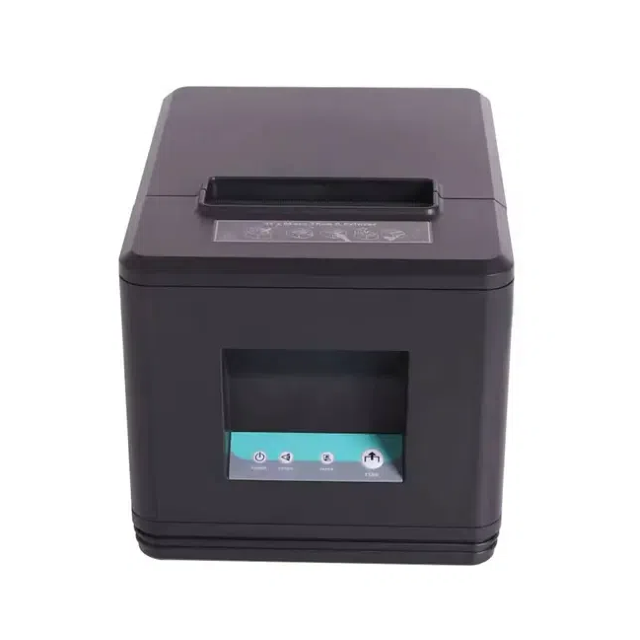
When done right, even a receipt can become a brand touchpoint. With a POS mini thermal printer, businesses ensure faster, clearer, and more personalized interactions—transforming routine transactions into positive experiences. These printers aren’t just efficient tools; they’re customer experience enhancers.
At OAWELL Products Co., Ltd., we offer robust, high-speed POS mini thermal printers that empower businesses of all sizes to deliver seamless service. From retail stores to mobile vendors, our printing solutions are designed for agility, clarity, and durability.
Looking to upgrade your POS experience? Contact us today to explore our product range and discover the POS mini thermal printerthat fits your business best.


